
Web Server for Local Development
Local web server environment using Podman and Nginx. Serves static site content with atomic deployments.
Prerequisites
- Podman installed (Windows: WSL2 + Podman, Linux/Mac: Podman)
Prepare environment
Step 1. Create static initial ./html/index.html
./html/index.html
source
html
<!DOCTYPE html>
<html lang="en">
<head>
    <meta charset="UTF-8">
    <meta name="viewport" content="width=device-width, initial-scale=1.0">
    <title>OdbVue</title>
</head>
<body>
    <h1>Hello OdbVue</h1>
</body>
</html>
Step 2. Create Nginx configuration file
./nginx.conf
source
ini
user nginx;
worker_processes auto;
error_log /var/log/nginx/error.log warn;
pid /var/run/nginx.pid;

events {
    worker_connections 1024;
}

http {
    include /etc/nginx/mime.types;
    default_type application/octet-stream;

    access_log /var/log/nginx/access.log;

    sendfile on;
    keepalive_timeout 65;

    server {
        listen 80;
        server_name _;
        root /var/www/site/current;

        # Serve from the 'current' symlink
        location / {
            try_files $uri $uri/ /index.html =404;
        }

        # Security headers
        add_header X-Frame-Options "SAMEORIGIN" always;
        add_header X-Content-Type-Options "nosniff" always;
        add_header X-XSS-Protection "1; mode=block" always;
        add_header Referrer-Policy "strict-origin-when-cross-origin" always;
    }
}
Step 3. Create Dockerfile
./Dockerfile
source
FROM nginx:alpine as builder

COPY nginx.conf /etc/nginx/nginx.conf
COPY ./html/index.html /usr/share/nginx/html/

FROM nginx:alpine

RUN apk add --no-cache \
    curl \
    ca-certificates

COPY --from=builder /etc/nginx/nginx.conf /etc/nginx/nginx.conf

HEALTHCHECK --interval=30s --timeout=3s --start-period=5s --retries=3 \
    CMD curl -f http://localhost/ || exit 1

EXPOSE 80

CMD ["nginx", "-g", "daemon off;"]
Step 4. Create Compose file
./compose.yaml
source
yaml
version: '3.9'

services:
  odbvue-web:
    build:
      context: .
      dockerfile: Dockerfile
    image: odbvue-web:latest
    container_name: odbvue-web
    ports:
      - "8080:80"
    volumes:
      # Mount releases directory so Nginx can follow the symlink
      - ./releases:/var/www/site:ro
      - ./nginx.conf:/etc/nginx/nginx.conf:ro
    environment:
      - TZ=UTC
    restart: unless-stopped
    networks:
      - odbvue-network
    labels:
      com.example.description: "OdbVue Nginx Static Web Server"

networks:
  odbvue-network:
    driver: bridge
NOTE
You can adjust other port than 8080 if needed, or if running multiple web servers
Step 5. Create Empty folder ./releases and add it to Git ignore
./.gitignore
source
ini
releases/Usage
Scripts
./build.sh
source
sh
#!/bin/bash
set -e

if command -v podman.exe >/dev/null 2>&1;  then
  PODMAN="podman.exe"
else
  PODMAN="podman"
fi

"$PODMAN" compose up -d --build
./deploy.sh
source
sh
#!/bin/bash

# ODBVue Web Server - Simple Deploy
# Copy files to pod's releases directory with atomic symlink switch
#
# Usage: ./deploy.sh [pod-name] [source-directory]
# Example: ./deploy.sh odbvue-web ./html
# Example: ./deploy.sh odbvue-web ../../../apps/dist

set -euo pipefail

# Color codes
RED='\033[0;31m'
GREEN='\033[0;32m'
YELLOW='\033[1;33m'
BLUE='\033[0;34m'
NC='\033[0m'

# Configuration
POD_NAME="${1:-}"
SOURCE_DIR="${2:-}"
RELEASES_DIR="$(cd "$(dirname "${BASH_SOURCE[0]}")" && pwd)/releases"
REL=$(date +%Y-%m-%d-%H%M%S)
DEST_REL="/releases/$REL"
CURRENT_LINK="/releases/current"

# Validation
if [[ -z "$POD_NAME" ]] || [[ -z "$SOURCE_DIR" ]]; then
    echo -e "${RED}Error: Missing arguments${NC}"
    echo "Usage: $0 [pod-name] [source-directory]"
    echo ""
    echo "Examples:"
    echo "  $0 odbvue-web ./html"
    echo "  $0 odbvue-web ../../../apps/dist"
    exit 1
fi

# Normalize source path
SOURCE_DIR="$(cd "$SOURCE_DIR" 2>/dev/null && pwd)" || {
    echo -e "${RED}Error: Source directory not found: $2${NC}"
    exit 1
}

# Helper functions
log_info() {
    echo -e "${BLUE}[INFO]${NC} $1"
}

log_success() {
    echo -e "${GREEN}[✓]${NC} $1"
}

log_warning() {
    echo -e "${YELLOW}[⚠]${NC} $1"
}

log_error() {
    echo -e "${RED}[✗]${NC} $1"
}

# Header
echo -e "${BLUE}╔════════════════════════════════════════════════════╗${NC}"
echo -e "${BLUE}║     ODBVue Deploy - Copy Files                    ║${NC}"
echo -e "${BLUE}╚════════════════════════════════════════════════════╝${NC}"
echo ""
log_info "Pod: $POD_NAME"
log_info "Source: $SOURCE_DIR"
log_info "Release ID: $REL"
log_info "Deploy to: $DEST_REL"
echo ""

# Step 1: Create release directory
log_info "Creating release directory..."
mkdir -p "$RELEASES_DIR/$REL" || podman exec "$POD_NAME" mkdir -p "$DEST_REL"
log_success "Release directory created"

# Step 2: Copy files
log_info "Copying files..."
if command -v rsync &>/dev/null; then
    rsync -av --delete \
        --exclude='.git' \
        --exclude='.gitignore' \
        --exclude='node_modules' \
        --exclude='.DS_Store' \
        "$SOURCE_DIR/" "$RELEASES_DIR/$REL/"
else
    cp -r "$SOURCE_DIR"/* "$RELEASES_DIR/$REL/" 2>/dev/null || true
    cp -r "$SOURCE_DIR"/.[!.]* "$RELEASES_DIR/$REL/" 2>/dev/null || true
fi
log_success "Files copied"

# Step 3: Verify deployment
log_info "Verifying deployment..."
if [[ ! -f "$RELEASES_DIR/$REL/index.html" ]]; then
    log_error "index.html not found in release directory"
    rm -rf "$RELEASES_DIR/$REL"
    exit 1
fi
log_success "Deployment verified (index.html found)"

# Step 4: Show old release
CURRENT_LINK="$RELEASES_DIR/current"
if [[ -L "$CURRENT_LINK" ]] && [[ -e "$CURRENT_LINK" ]]; then
    OLD_RELEASE=$(readlink "$CURRENT_LINK")
    log_info "Current active release: $OLD_RELEASE"
else
    log_warning "No previous release (first deployment)"
fi

# Step 5: Atomic symlink switch
log_info "Switching symlink (atomic cutover)..."
DEST_REL_BASENAME=$(basename "$DEST_REL")
ln -sfn "$DEST_REL_BASENAME" "$CURRENT_LINK.tmp"
mv -Tf "$CURRENT_LINK.tmp" "$CURRENT_LINK"
log_success "Symlink switched atomically"

# Step 6: Health check
log_info "Health checking..."
sleep 0.5
if curl -sf http://localhost:8080/ > /dev/null 2>&1; then
    log_success "HTTP health check passed"
else
    log_warning "HTTP health check (skipped)"
fi

# Step 7: Cleanup old releases (keep last 3)
log_info "Cleaning up old releases (keeping last 3)..."
# Count releases, only delete if we have more than 3
RELEASE_COUNT=$(find "$RELEASES_DIR" -maxdepth 1 -type d -name "[0-9]*-*" 2>/dev/null | wc -l)
if [[ $RELEASE_COUNT -gt 3 ]]; then
    # Keep last 3, delete the rest
    find "$RELEASES_DIR" -maxdepth 1 -type d -name "[0-9]*-*" | sort -r | tail -n +4 | xargs -r rm -rf
fi
log_success "Cleanup completed"

# Summary
echo ""
echo -e "${GREEN}╔════════════════════════════════════════════════════╗${NC}"
echo -e "${GREEN}║     Deployment completed successfully! ✓           ║${NC}"
echo -e "${GREEN}╚════════════════════════════════════════════════════╝${NC}"
echo ""
log_info "Active release: $DEST_REL"
echo ""
./remove.sh
source
sh
#!/bin/bash
set -e

CONTAINER_NAME="${1:-odbvue-db-dev}"

# Determine podman command (handle Windows)
if command -v podman.exe >/dev/null 2>&1; then
  PODMAN="podman.exe"
else
  PODMAN="podman"
fi

echo "Stopping container: $CONTAINER_NAME"
$PODMAN stop "$CONTAINER_NAME" 2>/dev/null || true

echo "Removing container: $CONTAINER_NAME"
$PODMAN rm "$CONTAINER_NAME" 2>/dev/null || true

# Find and remove the associated pod
# When using compose, the pod is named pod_<service-name> (e.g., pod_db)
echo "Looking for associated pods..."
POD_ID=$($PODMAN ps -ap --filter "name=$CONTAINER_NAME" --format '{{.PodName}}' 2>/dev/null | head -n1)

if [ -n "$POD_ID" ]; then
  echo "Removing pod: $POD_ID"
  $PODMAN pod rm "$POD_ID" 2>/dev/null || true
else
  # Try removing by common naming pattern (pod_<service-name>)
  echo "Removing pod by service name pattern..."
  $PODMAN pod rm "pod_db" 2>/dev/null || true
fi

echo "Successfully removed $CONTAINER_NAME"
Build & Run
Start container with web server:
bash
./build.shThis builds the Nginx container and starts it in the background. Web server runs on http://localhost:8080
Deploy new content
Deploy website content to the running container:
bash
./deploy.sh [container-name] [source-directory]Examples:
bash
./deploy.sh odbvue-web ./html
./deploy.sh odbvue-web ../../../apps/dist
What Deploy Does
- Creates timestamped release directory:
releases/YYYY-MM-DD-HHMMSS/ - Copies files
- Atomically switches
/releases/currentsymlink to new release - Health checks the deployment
- Keeps last 3 releases; cleans up old ones
Stop and Remove
Remove container with web server:
bash
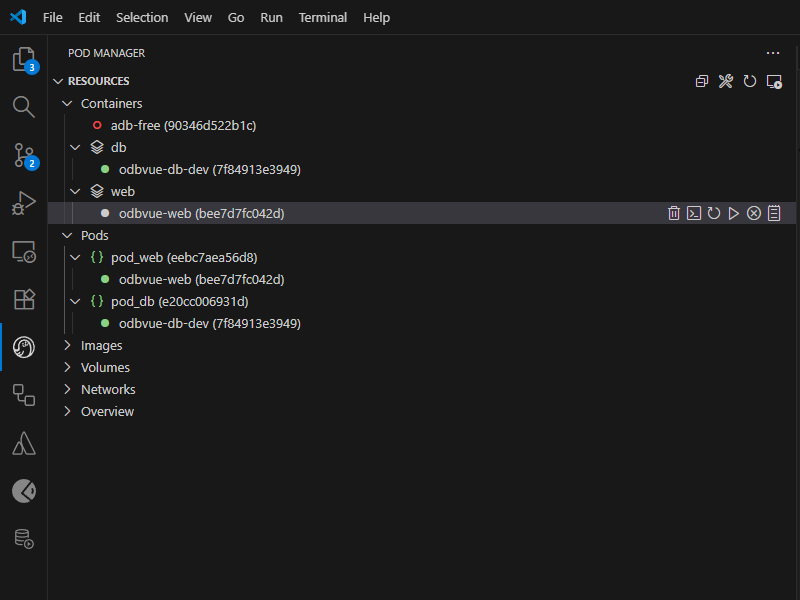
./remove.sh [container-name]Accessing container
After successful setup from VSCode Pod manager
Troubleshooting
Check container status:
bash
podman psView logs:
bash
podman logs [container-name]Test endpoint:
bash
curl http://localhost:8080