
File Based Routing
Overview
File based routing is a way to automate routing instead of statically typing routes. Check how to enable file based routing using Unplugin Vue Router.
Additionally, let's enable static Markdown content to be part of a page or the entire page.
Enable in project
- Install
unplugin-vue-routerandunplugin-vue-markdown
ps
pnpm install -D unplugin-vue-router
pnpm install unplugin-vue-markdown- Add the plugin to
./vite.config.ts:
ts
import { fileURLToPath, URL } from 'node:url'

import { defineConfig } from 'vite'
import vue from '@vitejs/plugin-vue'
import vueDevTools from 'vite-plugin-vue-devtools'
import VueRouter from 'unplugin-vue-router/vite'
import Markdown from 'unplugin-vue-markdown/vite'

// https://vite.dev/config/
export default defineConfig({
  plugins: [
    Markdown({}),
    VueRouter({ extensions: ['.vue', '.md'] }),
    vue({
      include: [/\.vue$/, /\.md$/]
    }),
    vueDevTools(),
  ],
  resolve: {
    alias: {
      '@': fileURLToPath(new URL('./src', import.meta.url))
    },
  },
})- Add auto-generated route file and compiler option to
./tsconfig.app.json
json
{
  "extends": "@vue/tsconfig/tsconfig.dom.json",
  "include": ["env.d.ts", "src/**/*", "src/**/*.vue"],
  "include": ["env.d.ts", "src/**/*", "src/**/*.vue", "wiki/**/*", "./typed-router.d.ts"],
  "exclude": ["src/**/__tests__/*"],
  // rest
}- Add the
unplugin-vue-router/clienttypes to./env.d.tsfile.
ts
/// <reference types="vite/client" />
/// <reference types="unplugin-vue-router/client" />- Exclude
vue-router/autofrom VSCode import suggestions by adding this setting to your./.vscode/settings.json:
json
{
//
  "typescript.tsdk": "node_modules/typescript/lib",
  "typescript.preferences.autoImportFileExcludePatterns": ["vue-router/auto$"]
//
}- Allow pages to be single worded in
./.eslint.config.ts
js
//
export default [
  // ...
  {
    files: ['src/pages/**/*.vue'],
    rules: {
      'vue/multi-word-component-names': 'off',
    },
  },
]- Create pages and contents for testing
@/pages/index.vue
vue
<template>
  <h1>Home</h1>
  <p>Hallo OdbVue</p>
</template>@/pages/about.md
md
---
title: About
description: Learn more about our platform and its capabilities
icon: $mdiInformation
role: public
color: #FA8531
---

# About

This is an `About` page- Modify
@/router/index.ts
ts
import { createRouter, createWebHistory } from 'vue-router'
import { routes, handleHotUpdate } from 'vue-router/auto-routes'

const router = createRouter({
  history: createWebHistory(import.meta.env.BASE_URL),
  routes,
})

if (import.meta.hot) {
  handleHotUpdate(router)
}

export default router- Modify
@/App.vue
vue
<template>
  <router-link to="/">Home</router-link>
  |
  <router-link to="/about">About</router-link>
  <br />
  <br />
  <router-view />
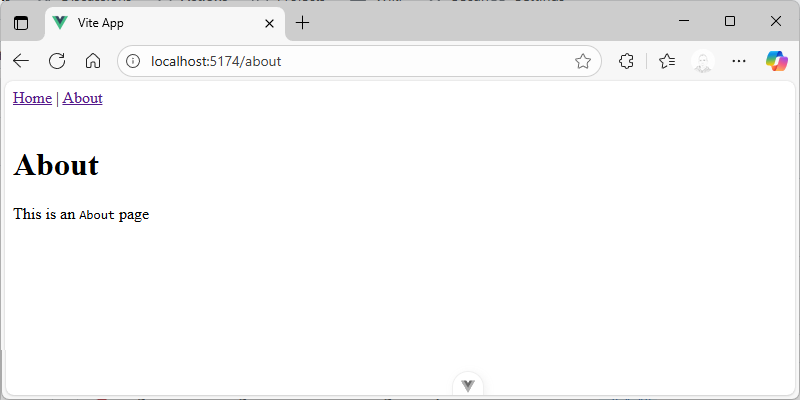
</template>- Test the app
pnpm devthat the new file based routing works as expected.
Meta from Markdown
Add feature to vite.config.ts to extend route with meta information from .md files so it would have same capabilities as Route Meta Fields for Vue single file components.
ts
import { fileURLToPath, URL } from 'node:url'
import { promises as fs } from 'node:fs'

import { defineConfig } from 'vite'
import vue from '@vitejs/plugin-vue'
import vueDevTools from 'vite-plugin-vue-devtools'
import VueRouter from 'unplugin-vue-router/vite'
import Markdown from 'unplugin-vue-markdown/vite'

async function extractMetaFromMarkdown(absolutePath: string): Promise<Record<string, unknown> | null> {
  try {
      const mdContent = await fs.readFile(absolutePath, 'utf-8');
      const metaRegex = /^---\n([\s\S]*?)\n---/;
      const match = mdContent.match(metaRegex);
      if (match && match[1]) {
          const metaString = match[1];
          const metaLines = metaString.split("\n");
          const metaObject: Record<string, unknown> = {};
          for (const line of metaLines) {
              const [key, ...valueParts] = line.split(":");
              if (key && valueParts.length) {
                  const value = valueParts.join(":").trim();
                  metaObject[key.trim()] = value.startsWith('"') && value.endsWith('"')
                      ? value.slice(1, -1)
                      : value;
              }
          }
          return metaObject;
      }
      return null;
  } catch (error) {
      console.error(`Error reading file at ${absolutePath}:`, error);
      return null;
  }
}

// https://vite.dev/config/
export default defineConfig({
  plugins: [
    Markdown({}),
    VueRouter({
      routesFolder: [
        {
          src: 'src/pages',
          exclude: ['**/_components/**'], //to have local components
        },
      ],
      extensions: ['.vue', '.md'],
      async extendRoute(route) {
      if (route.component?.endsWith('.md')) {
        const meta = await extractMetaFromMarkdown(route.component)
        if (meta)  route.meta = { ...route.meta, ...meta }
      }
    },
    }),
    vue({
      include: [/\.vue$/, /\.md$/]
    }),
    vueDevTools(),
  ],
  resolve: {
    alias: {
      '@': fileURLToPath(new URL('./src', import.meta.url))
    },
  },
})